After many months of development, I'm very pleased to announce the release of Sublime Text 1.2. This is the most significant upgrade of Sublime Text since the initial release, and it's free for all registered users. If you haven't purchased a license yet, you can download a fully functional evaluation version.
New features in version 1.2 include a revised user interface, a project system, and support for TextMate format snippets, many of which are installed by default. In addition to this, it's more customisable, has an enhanced Python API, and improved facilities for day to day text editing.
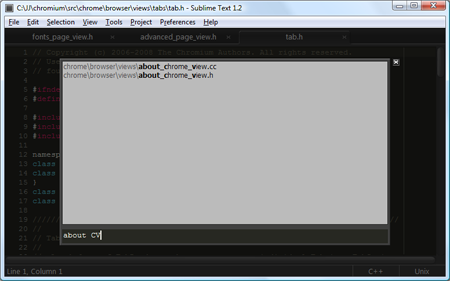 Selecting a file in the project
Changelog Highlights
New project system
Updated user interface look and feel
Support for TextMate format snippets
Resizeable panes and panels in the GUI
Distraction free editing mode
Quick panel, to select between open buffers, file in the current directory, or files in the project.
Visible whitespace
Overwrite mode
Load and save files in various european encodings
New preferences menu
Swap lines command
Improved auto complete
Improved bracket matching
Improved auto pairing of brackets and quotes
Improved bookmark support
Close buttons per-tab by default
Minimap and scrollbars may be disabled in full screen mode
Assign names to buffers
API: Exposed auto complete functionality
API: Exposed findAll
API: Exposed quick panel
API: Exposed the input panel
Download it now, and try it out!
